How to Delete your Account
If you would like to permanently delete your Roamigoo account and all associated data, you can do so directly from the Roamigoo mobile app.
📱 Steps to Delete Your Account
Open the Roamigoo App
Open the Roamigoo app on your Android or iOS device.
Log In
Sign in to your Roamigoo account using your registered login credentials.
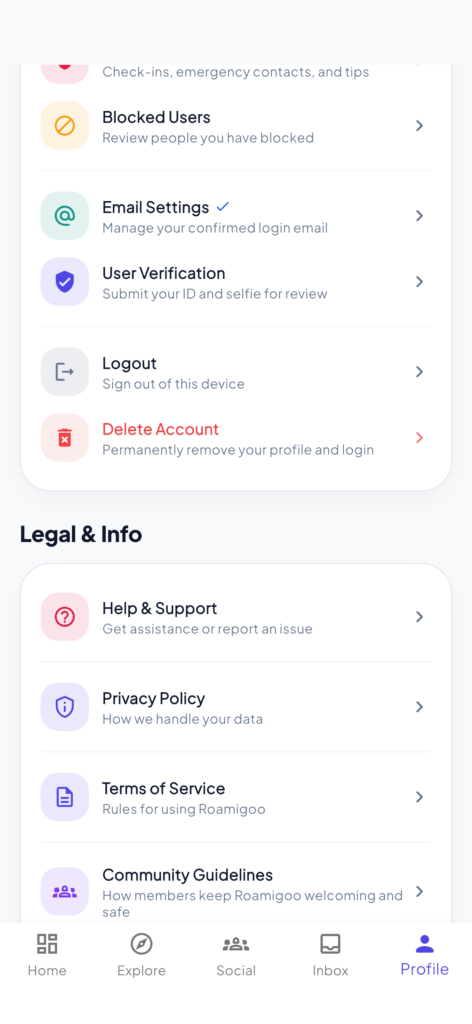
Go to Your Profile
Open the Profile section from the app.
Scroll Down
Scroll to the bottom of the Profile page.
Select “Delete Profile”
Tap Delete Profile to begin the account deletion process.
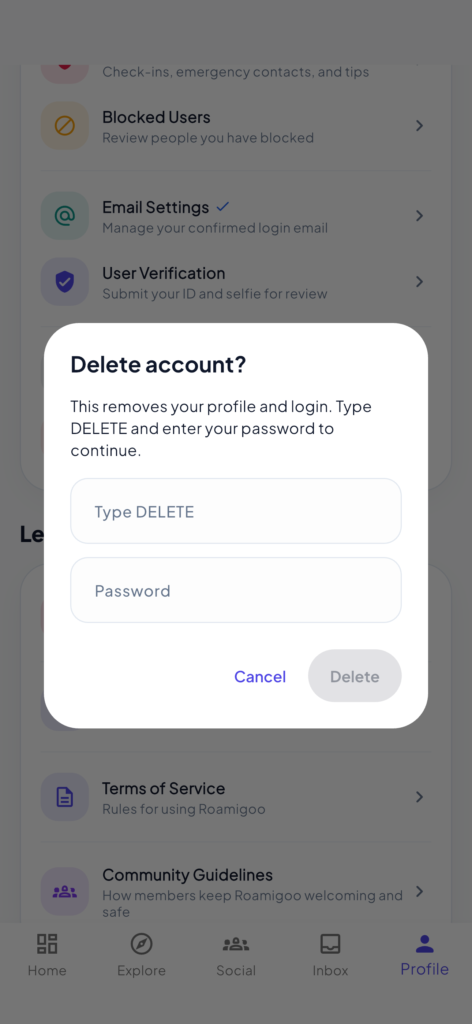
Confirm Account Deletion
Type
DELETEin the confirmation field.Enter your account password.
Complete the Deletion
Confirm the deletion request.
Your Roamigoo profile and associated account data will be permanently deleted immediately.
⚠️ Important
Account deletion is permanent and cannot be undone.
Once your account is deleted, you may not be able to recover your profile or associated information.
Please make sure you want to permanently delete your account before confirming.
🆘 Need Help?
If you experience any issues while trying to delete your account, please contact our support team:
Email: support@roamigoo.com
Our support team will be happy to assist you with your account deletion request.